Check out the top tools you need to stay ahead in the fast-paced world of content creation. Ready to take your content to new heights?
Introduction
Content creation is an art, but it's also a science. While creativity drives the content, using the right tools helps polish it to perfection and get it in front of the right audience. Whether you're a writer, designer, marketer, or all of the above, the tools you use can make or break your productivity. This article will take you through some of the most essential tools that everyone in content creation should be using, no matter what their specialty is.
Content Creation: What Does It Involve?
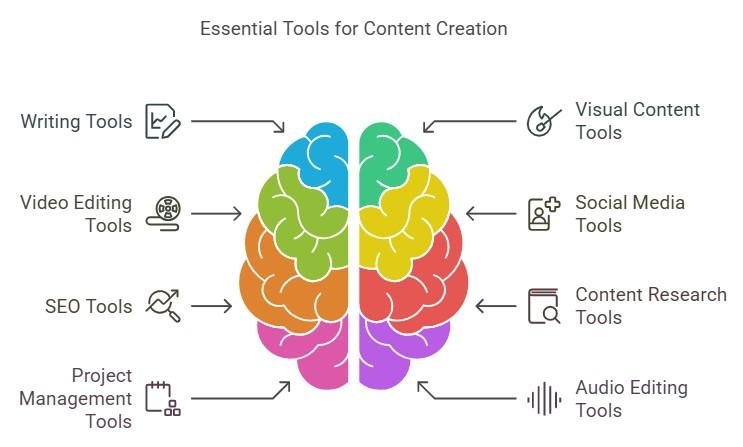
Content creation is a multi-faceted process that extends beyond just writing. It's about creating compelling text, eye-catching visuals, engaging videos, and promoting content across various channels. The tools you use for these tasks can elevate your content and streamline your workflow. Let's break it down:
Writing and Editing: This includes everything from drafting blog posts and articles to refining them for clarity, readability, and SEO.
Visual Design: Graphics, images, infographics, and illustrations are critical to making content visually appealing and shareable.
Video Production: Video is one of the most engaging forms of content. Tools for filming, editing, and enhancing video can help deliver impactful stories.
Marketing and Distribution: Once content is created, it's time to share it. This involves social media tools, email marketing, and SEO to ensure your content gets the attention it deserves.
Must-Have Tools for Writers
As a writer, getting your thoughts down on paper (or screen) is just the first step. To make your content shine, editing and grammar checking are crucial. These tools make it easier to write and proofread like a pro.
Grammarly: This AI-powered tool helps correct grammar, spelling, and punctuation mistakes. It also offers suggestions for improving readability.
Hemingway Editor: Hemingway is perfect for improving writing clarity. It helps you write in a simpler, more direct way by flagging complex sentences and excessive adverbs.
Google Docs: A classic tool, Google Docs allows for easy collaboration, commenting, and sharing, making it ideal for team projects and client feedback.
Tools for Visual Content Creators
Visual content is incredibly important in today’s digital landscape. Whether you're creating banners, social media posts, or illustrations, these tools will help you design stunning visuals.
Canva: Canva is a user-friendly platform that offers templates for all kinds of design projects, from social media posts to presentations. It’s perfect for beginners and professionals alike.
Adobe Creative Cloud: For advanced design needs, Adobe’s suite of software (Photoshop, Illustrator, InDesign) provides the power to create complex graphics and designs.
Figma: Figma is a web-based design tool that allows for real-time collaboration, making it a great choice for teams working on visual projects.
Video Creation and Editing Tools
In an age of short-form videos and long-format content, having the right video tools is crucial to producing high-quality visual content.
Adobe Premiere Pro: Premiere Pro is a professional-grade video editing tool used by filmmakers and content creators alike. It offers advanced features like multi-camera editing and color grading.
Final Cut Pro: Exclusively for Mac users, Final Cut Pro offers a seamless video editing experience with powerful tools for editing and post-production.
DaVinci Resolve: Known for its color grading and editing capabilities, DaVinci Resolve is free to use and offers features on par with high-end software.
Social Media Management Tools
Managing social media posts, tracking performance, and staying organized can be overwhelming without the right tools.
Hootsuite: A popular social media management platform that lets you schedule posts, engage with followers, and track analytics all in one place.
Buffer: Buffer allows you to schedule posts on multiple platforms, track engagement, and analyze performance over time.
Later: Later specializes in visual scheduling, making it easy to plan and post content on Instagram, Facebook, and Pinterest.
SEO Tools to Improve Content Visibility
SEO is an essential part of content creation. These tools help ensure your content ranks higher in search engine results, driving more traffic to your website.
SEMrush: SEMrush is a comprehensive SEO tool that offers keyword research, site audits, and backlink tracking.
Ahrefs: Ahrefs is known for its backlink analysis and keyword research features. It’s perfect for tracking your site's SEO health.
Moz: Moz offers a suite of tools designed to improve search engine rankings, including keyword research and link building.
Content Research Tools
Before you start creating, understanding what your audience wants to know is key. These tools help you discover trending topics, gather insights, and stay ahead of the competition.
BuzzSumo: BuzzSumo helps you identify top-performing content in your niche by analyzing social shares and backlinks.
Feedly: Feedly is an RSS feed reader that aggregates content from various blogs and websites, allowing you to stay updated on industry news and trends.
Pocket: Pocket lets you save articles, videos, and other content for later viewing, which is great for collecting research material.
Collaboration and Project Management Tools
Working with a team? These tools help streamline communication, manage tasks, and keep everyone on the same page.
Trello: Trello’s card-based project management system allows teams to collaborate and track tasks visually.
Asana: Asana is a task and project management tool that helps teams plan, organize, and track content creation workflows.
Slack: Slack is a messaging platform that allows team members to collaborate and communicate in real-time, making it perfect for fast-paced work environments.
Audio Editing and Podcasting Tools
If audio content is your focus, here are the tools that will help you create, edit, and publish high-quality podcasts.
Audacity: Audacity is a free, open-source audio editor that allows for detailed editing and mixing.
GarageBand: For Mac users, GarageBand offers an intuitive interface for recording and editing podcasts.
Anchor: Anchor allows you to record, edit, and distribute your podcast to major platforms all from one app.
Analytics Tools for Performance Tracking
Understanding how your content is performing is vital to improving your strategy. These analytics tools track everything from website traffic to social media engagement.
Google Analytics: Google Analytics provides detailed insights into website traffic, user behavior, and conversion rates.
Hotjar: Hotjar helps visualize user behavior with heatmaps, session recordings, and surveys to improve user experience.
Kissmetrics: Kissmetrics focuses on customer behavior, helping you optimize your content for better engagement and conversions.
Content Distribution Tools
Getting your content in front of the right audience is half the battle. These tools help you distribute your content effectively.
Mailchimp: Mailchimp is a popular email marketing tool that helps you send newsletters, automate campaigns, and track performance.
Substack: Substack allows you to build a newsletter and monetize your writing, perfect for content creators looking to connect with their audience directly.
The right tools can make a huge difference in your content creation process. From writing and editing to designing and marketing, there’s a tool for every step of the journey. By investing in these tools, you’ll not only save time but also improve the quality and reach of your content. So, take the time to explore and find the tools that work best for you.
Hi, I’m Melvina Lubowitz, Your Blogging Journey Guide 🖋️. Writing, one blog post at a time, to inspire, inform, and ignite your curiosity. Join me as we explore the world through words and embark on a limitless adventure of knowledge and creativity. Let’s bring your thoughts to life on these digital pages. 🌟 #BloggingAdventures
Leave a comment
Your email address will not be published. Required fields are marked *
Your experience on this site will be improved by allowing cookies.